
cell (914) 572-0454
email lang@SkillShaper.com
Using the Watch App
1. Mount the watch on the rod
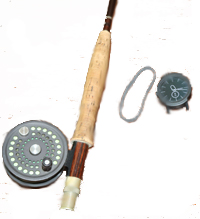
Items needed: An Android Watch, a fly rod, reel and 2-3 inch rubber band.
Step 1: Loop the rubber band a couple times at the front of the rod grip.
Step 2: Strap the watch onto the grip, securing its strap with the rubber band.
Step 3: Grip the rod with thumb-on-top. Hold the watch band against the grip with your thumb.
2. Launch the app
3. Select a skill (optional)
The default skillshaping option provides feedback to your Stroke movements.
If you want a different feedback, click on the Settings menu button and select a different skill.
"Stroke Feedback"
Hear the force (acceleration) of your rod
on the path of your cast. The more the
force: the higher the pitch and louder the sound will be.
The key to an efficient cast is to start strokes slowly and
accelerate smoothly to a crisp stop. This produces longer casts with less effort.
"Stop Feedback"
Build muscle memory for crisp stopping at
the end of the stroke. You will hear it when you put on the brakes
at the end of the stroke.
Sharper stops make higher pitched sounds and other things being
equal, the cast with a sharper stop will be one with a tighter loop.
This is especially important when casting
in a wind or reaching for distance.
"Track Feedback" This option makes a sound when the rod veers to one side or the other during a stroke. To develop the muscle memory by practicing until you hear no sound at all.
4. Pair with a phone
Pair your watch with an Android phone to stream sensor data to the phone for richer processing.
The phone lets you:
. See a Chart of the
cast
. Replay its sound.
. Review Old Sessions.
. Send to another address. Email session
records to your own computor or to your coach.
5. Start a casting session
Press the green START button. This turns on the accelerometer in
the watch, starts the sound-playing program and if the watch is
paired with a phone, starts streaming the data to the phone.
Begin casting - and listen to your movements
6. Stop a session
Press the red button labelled STOP
If you had been paired with a smart phone, you can send a data file to your desktop for later review and analysis.
Go to the phone screen and press the SEND button at the bottom of the screen. Wait a few seconds while the phone's app processes the data and creates a data file attachment.
Then follow the on-screen instructions to email the data to the email address of your choice.
Be sure to obey the "Pease Wait" messages before proceeding at each step!
7. Close the app
Click on the "QUIT" button.
Smart watch
Needed items:
Rod, rubber band, watch
Thumb on watch band

Start the app

Select a skill
